For organisers of conferences, public ceremonies and corporate events
AI captions and translation for events.
Real-time captions and translation on the venue screen (~1.7 s), on every attendee’s phone and on your professional video outputs. The efficient, transparent, buy-it-yourself alternative to Wordly and Interprefy.
- No interpreters
- 58 languages
- No app
Bonjour et bienvenue à la journée sur l’accessibilité de Saragosse.
Spanish · original
English
How it works
Ten minutes to set up.
Languages
58 languages.
Point at a language to see its flag.
Four in one
What used to take four suppliers.
The audience doesn’t just read.
They ask, vote and take part.
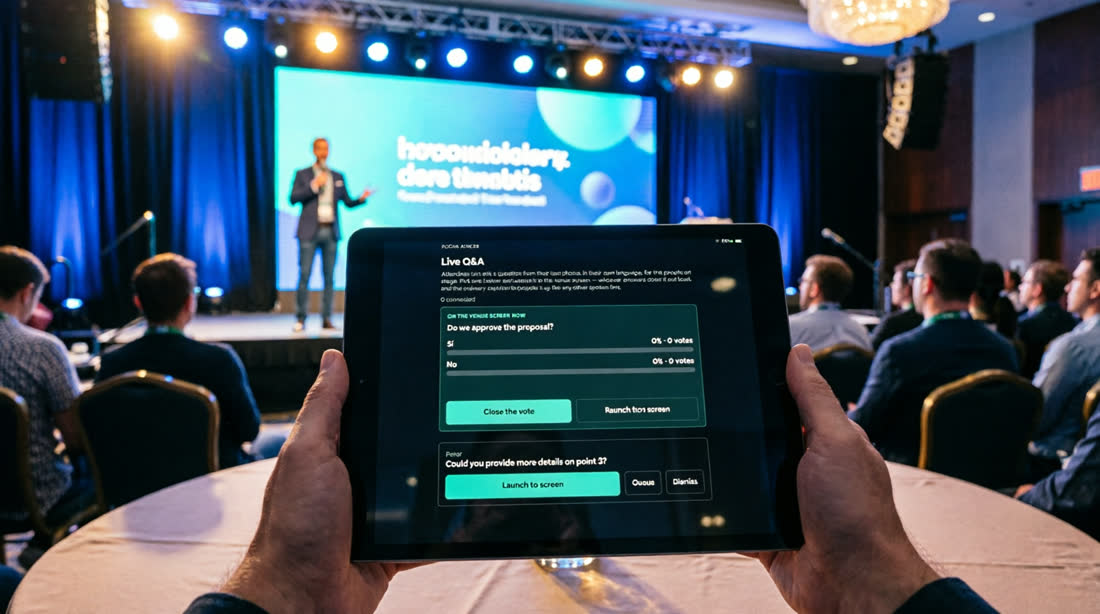
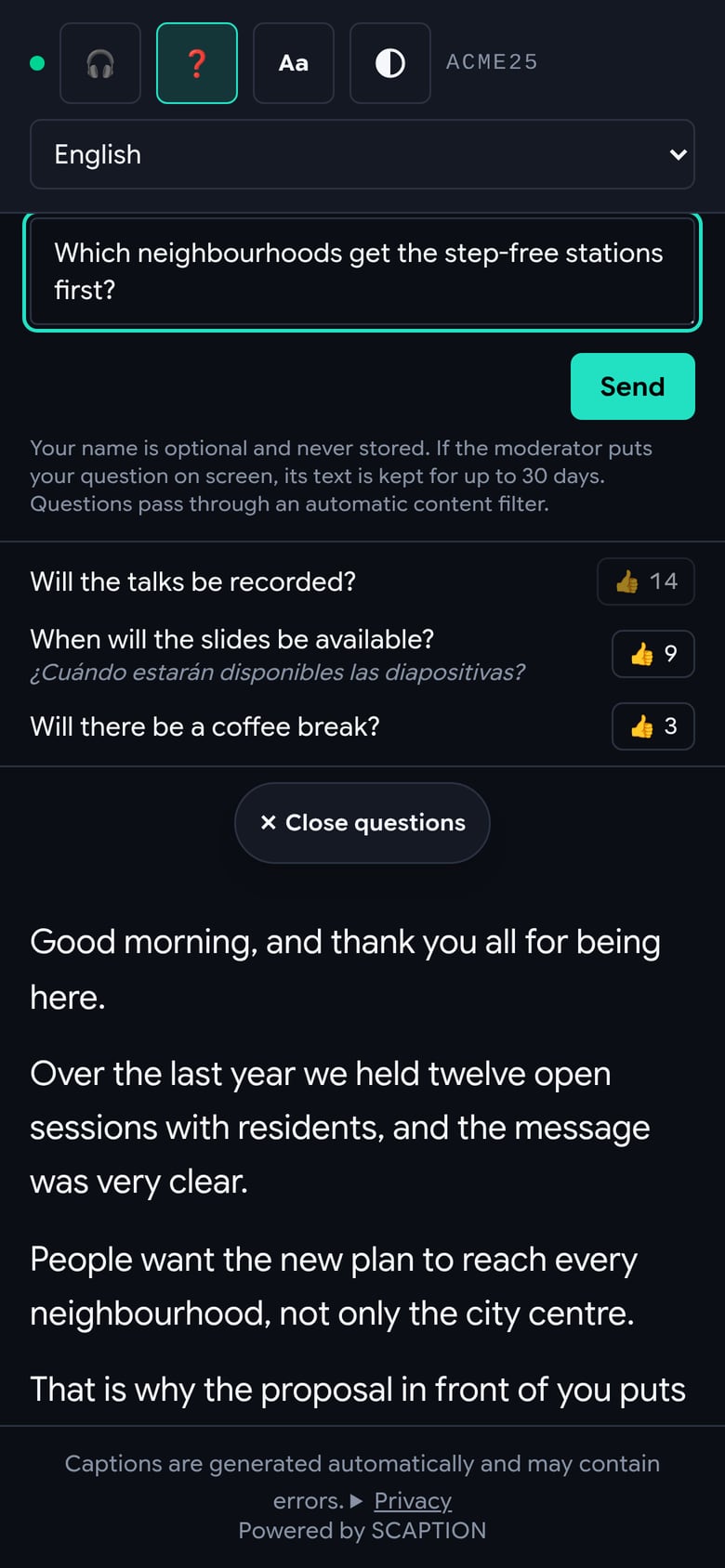
From their own phone, in their own language, with no app and no sign-up. And only what the moderator decides goes on the screen.
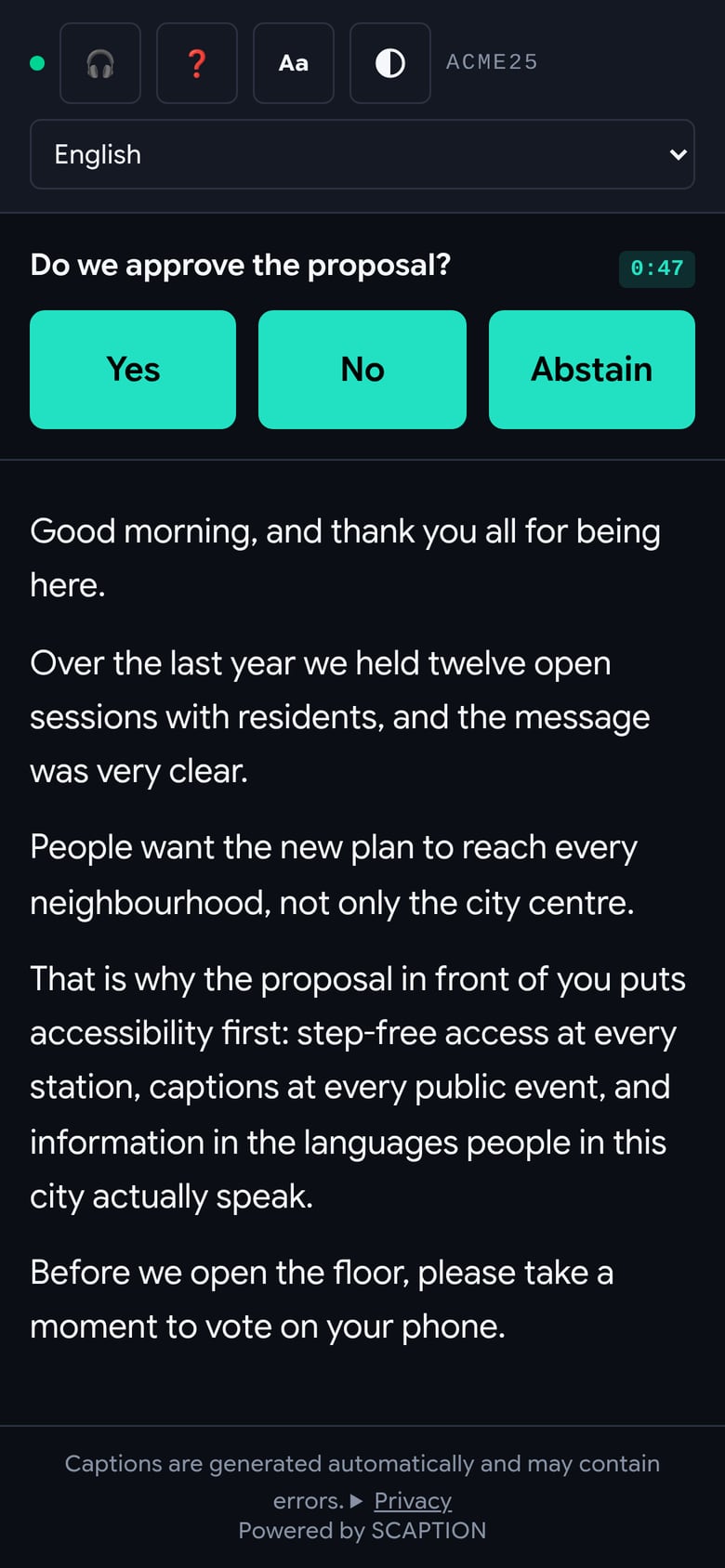
Try it: vote from the phone or put a question on the screen.
Join at scaption.app/live with code ZGZ26
Approuvons-nous la proposition ?
Touchez une réponse
- The attendeeScans the QR and writes or votes from their phone, in their language.
- The moderatorReceives everything translated on a tablet and decides what to launch.
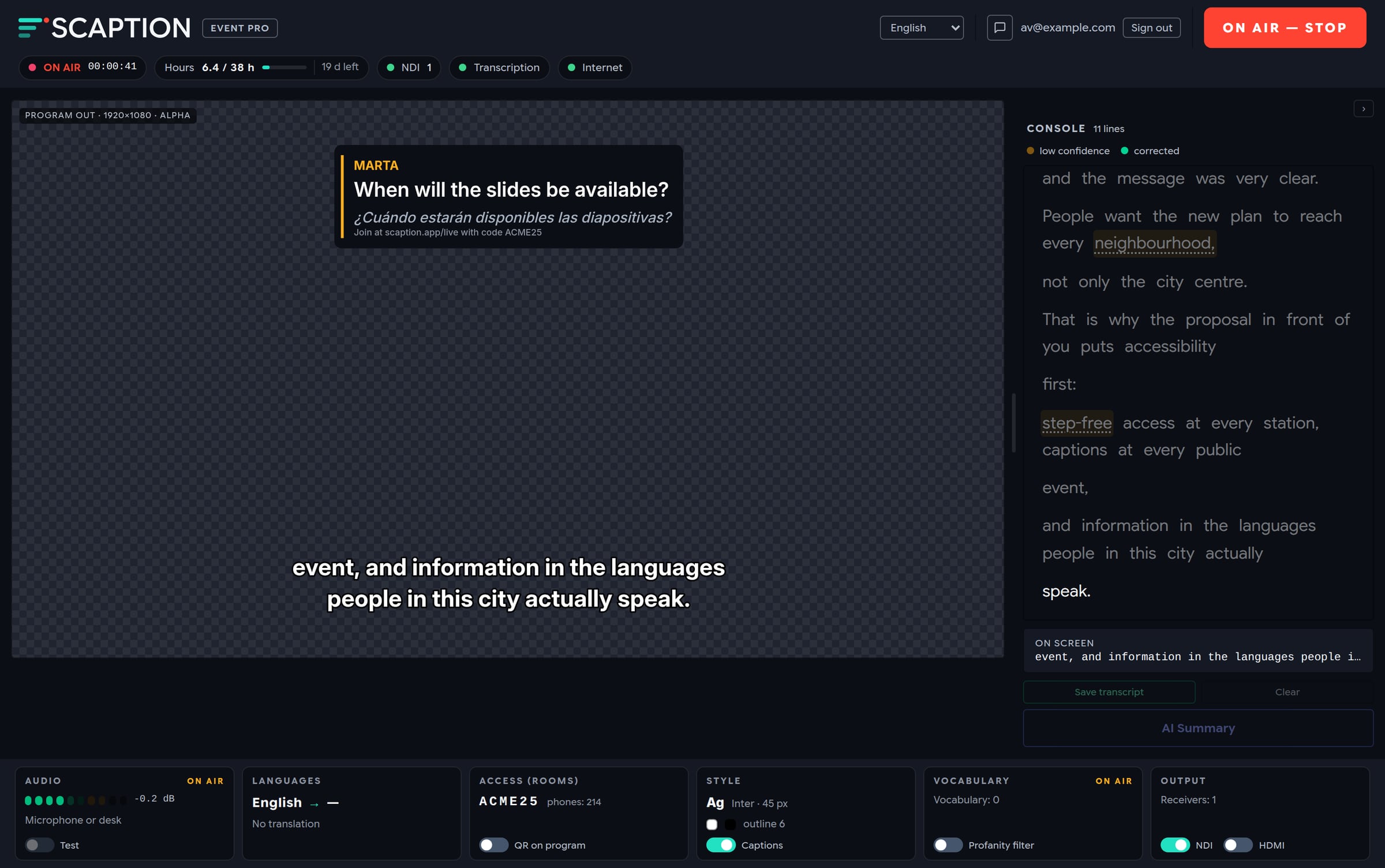
- The screenShows the question or the live result, over your captions.
- One vote per phone
- No sign-up, no account
- Automatic offensive-content filter
- Exportable results
- Everything lands in the AI summary
Real captures
This is what it looks like at an event.
No mock-ups: the attendee’s phone and the operator’s console, captured from SCAPTION’s own screens.
New
Captions on any screen. One code for the whole conference.
Any TV with a browser
Open scaption.app/screen and that’s it. No NDI, no second machine.
- Original and translation at once
- A QR to follow along on the phone
- If the connection drops, the screen fades out
Spanish · original
English
One code, several rooms
The attendee scans the code and picks their room.
- Reserved weeks in advance
- Each room with its own questions, votes and summary
- Everything closes when the conference ends
Compare
Against what you use today.
Against other live translation platforms
What each company publishes on its own website, checked on 13 September 2026.
Cost per hour
Published price of one hour of service.
Interprefy does not publish prices, so it is not in the bars. “Not listed” means we did not find it on their public website, not that they do not offer it. Third-party prices in dollars as published; SCAPTION in euros, excluding VAT.
Pricing
Per event, per month or per year.
No lock-in. Questions, votes and summaries on every plan.
Accessibility
Captions in the speaker’s language
For public events, classes and single-language conferences.
- Captions on the screen and on the phone, in the speaker’s language
- Questions, votes and AI summaries
- One microphone
Extra hour: 20 €
Event Pro
Translated into 58 languages, 12 at once
For conferences with an international audience.
Everything in Accessibility, plus:
- Live translation, up to 12 languages at once
- Each attendee reads or listens in their language
- Two microphones, with each speaker’s name
Extra hour: 40 €
Broadcast Multi-Mic
Panels, four microphones
For panels, debates and studios.
Everything in Event Pro, plus:
- Four microphones at once
- More hours on the monthly subscription
- Priority support
Extra hour: 60 €
One free hour, no card · Prices exclude VAT · Yearly: two months free.
Trust
What a tender asks.
Pilot programme · autumn 2026
Five events. We set it up with you.
An Event Pro pass at the published price, your vocabulary prepared together and support on the day.
For your technician or production company
It fits the production setup you already have.
NDI with alpha for vMix, TriCaster and OBS · chroma HDMI · a chroma-key browser URL for any computer · 4 channels at once over ASIO or Core Audio · API for Companion, Crestron and Q-SYS.
FAQ
What organisers ask before they buy.
The product
Is it artificial intelligence or human interpreters?
Artificial intelligence, with nobody in a booth. It performs well on clear speech; for highly technical, legal or improvised content a professional interpreter is still more accurate. The two can work together: SCAPTION captions while the interpreter speaks through the headsets.
How accurate is it?
Good on clear speech, and tested language by language. The real gain comes before the event: names, acronyms and brands go into the vocabulary and are recognised and kept intact in every language.
What if the speaker has an accent or talks fast?
The models recognise accents and regional variants. With a fast speaker nothing that was said is dropped: it is written at a pace people can read.
Several speakers, or several languages on stage?
Up to 4 microphones, with each speaker’s name in the summary and on the audience’s phones. If speakers switch languages, automatic detection follows the change across 10 major languages.
Is there translated audio, not just text?
Yes, on each attendee’s phone: the phone reads the captions aloud with its own system voice. No headsets to hand out. It is not voice-cloned dubbing.
How many attendees can an event handle?
Tested with 5,000 phones connected at once without losing a line. At the latency we promise, up to about 1,000 per room. The real limit is usually the venue’s Wi-Fi.
Can anyone put a question on the screen?
No. Audience questions go to a moderation panel and only the one the moderator launches appears on screen. An automatic filter holds offensive ones back for the moderator to review first.
Set-up
Do I need a sound technician?
If the event has a PA system, it helps: clean audio comes from the sound desk and connects in minutes. In a small room or an online event, a laptop and a USB microphone near the speaker is enough.
Does it work with Zoom, Teams, Meet or Webex?
Yes, with any of them. SCAPTION listens to the computer’s own audio, so there is no integration to approve and no bot to invite. The link goes in the chat and each attendee picks a language.
Does it work for a hybrid event?
Yes. People in the room read on the screen or their phone; remote attendees open the same link from home. One set-up for both.
What connection does it need?
A stable internet connection on the laptop running SCAPTION. The audio it uploads is lighter than a video call.
Does the audience have to install anything?
No. They scan the QR and a page opens in the browser. Pick a language and read. No sign-up, no download.
Can I run several rooms at once?
Yes, on monthly and yearly plans, with no limit on simultaneous rooms. And a conference can use a single printed code that opens the list of rooms.
Data
Where is the data processed?
Speech is transcribed in your account’s region: the European Union by default for accounts opened in Europe, or the Americas or Asia-Pacific, as the owner chooses. Translation runs mainly on OpenAI in the USA, with a backup provider in that region, under a data processing agreement and standard contractual clauses. The database is always in Frankfurt. The list of subprocessors is public.
Is my data used to train models?
No. Every speech and translation provider excludes it by contract.
Is the transcript stored?
No, unless you request the AI summary or keep it when closing the app: then it is kept for 30 days and deleted automatically.
What if the event is confidential?
Use only the venue screen, without the QR: the access code is not a password and anyone who has it can read along. And skip the summary, questions and votes: the only things kept, for 30 days, are the transcript you ask to keep, questions put on screen and vote results. Questions and votes you prepare in advance stay until you release the room.
Does it meet accessibility rules?
Live captions are the measure European rules call for so that deaf and hard-of-hearing people can follow public events. SCAPTION provides it; the event’s overall compliance is the organiser’s responsibility.
Are you ISO 27001 certified?
Not yet. What we have is public: privacy policy, list of subprocessors, a data processing agreement on request and a service status page.
Price and the day itself
How much does a one-day event cost?
99 € for captions only, 249 € with translation and 499 € with four microphones. Eight hours with the speaker talking; breaks do not count. Excluding VAT. The one-hour trial is free and needs no card.
What if I go over the hours?
On a paid plan the event is never cut off: extra hours are billed at the published rate for each plan. The free trial stops when its hour runs out.
What if something fails live?
Transcription and translation each have a backup provider, and switching is automatic. Sessions with several microphones, and a few languages, have no transcription backup. If the connection drops, the screen fades out cleanly: never a frozen caption or an error in front of the audience. The service status is public.
What support is there on the day?
Email support on every plan, priority on Broadcast. In the pilot programme we are with you remotely throughout the day. We do not send technicians to the venue.
Are there discounts for public bodies, universities or NGOs?
Yes: 10% off for non-profits, education and the public sector. Write to us about the event and we apply it to your quote. Invoices show VAT separately and come with the paperwork procurement needs.